> ## Documentation Index
> Fetch the complete documentation index at: https://docs.archil.com/llms.txt
> Use this file to discover all available pages before exploring further.
# Code interpreter
> Give an AI agent a stateful Python kernel in a persistent sandbox to analyze a public dataset, with results on an Archil disk.
An agent that answers questions about data needs to write Python, look at the result, and keep going. The usual way to give it that is a code interpreter: a `python` tool backed by a long-running Jupyter kernel, so a dataframe loaded in one call is still in memory for the next, just like cells in a notebook.
In this guide you build one on Archil and use it to analyze a year of [Ookla's open speed test data](https://github.com/teamookla/ookla-open-data). Archil handles the three parts that are usually awkward:
* **The data stays where it is.** The public S3 bucket is attached as an Archil disk and mounted read-only, so the kernel reads the Parquet files directly. There's no download step, and pandas fetches only the columns it asks for.
* **The kernel's memory survives between sessions.** The kernel runs in a [persistent sandbox](/compute/sandboxes/introduction). When you pause the sandbox, the kernel is frozen with it, and the next session finds the dataframes still loaded.
* **Results outlive the sandbox.** The agent writes charts and reports to a second Archil disk, which your app can read without going through the sandbox.
## Prerequisites
Export your Archil API key, a region where sandboxes are available (`aws-us-east-1`, `aws-us-west-2`, or `aws-eu-west-1`), and an [AI Gateway](https://vercel.com/ai-gateway) key for the model. The Ookla bucket is in `us-west-2`, so that region is the closest to the data.
```bash theme={null}
export ARCHIL_API_KEY=key-...
export ARCHIL_REGION=aws-us-west-2
export AI_GATEWAY_API_KEY=...
```
Then install the dependencies. The TypeScript agent uses the [AI SDK](https://ai-sdk.dev); the Python agent calls the same model through the gateway's OpenAI-compatible API.
```bash TypeScript theme={null}
npm init -y && npm pkg set type=module
npm install disk ai zod tsx
```
```bash Python theme={null}
pip install archil openai
```
## Run a kernel in the sandbox
Two files run inside the sandbox. The first is a setup script that installs pandas and Jupyter's `ipykernel` into a virtual environment and starts a kernel as a supervised service named `kernel`. The kernel's connection file, which holds its ports and signing key, is written in advance to `/root/kernel.json`, so clients can find the kernel and it keeps the same address if the service restarts. `MPLBACKEND=Agg` makes matplotlib render to files instead of trying to display plots.
```bash setup.sh theme={null}
set -euo pipefail
python3 -m venv /opt/kernel
/opt/kernel/bin/pip install --quiet ipykernel pandas pyarrow matplotlib
/opt/kernel/bin/python -c 'from jupyter_client import write_connection_file; write_connection_file("/root/kernel.json")'
archil-sandbox services create kernel --dir /workspace --env MPLBACKEND=Agg -- \
/opt/kernel/bin/python -m ipykernel_launcher -f /root/kernel.json
```
The second is a small client that runs one piece of code in that kernel, the same way a notebook runs a cell. It reads the code from the `CODE` environment variable, prints whatever the code prints, the value of its last expression, and any traceback, and exits. The kernel keeps running, so the next call sees the same variables. If code runs for more than 100 seconds, the client interrupts it, like pressing stop in a notebook, and the kernel's state is kept.
```python run.py theme={null}
import os
import re
from jupyter_client import BlockingKernelClient
client = BlockingKernelClient()
client.load_connection_file("/root/kernel.json")
client.start_channels()
client.wait_for_ready(timeout=60)
output = []
def collect(msg):
content = msg["content"]
if msg["msg_type"] == "stream":
output.append(content["text"])
elif msg["msg_type"] in ("execute_result", "display_data"):
output.append(content["data"].get("text/plain", "") + "\n")
elif msg["msg_type"] == "error":
# Tracebacks are colored with ANSI escape codes; strip them for the model
output.append(re.sub(r"\x1b\[[0-9;]*m", "", "\n".join(content["traceback"])) + "\n")
try:
client.execute_interactive(os.environ["CODE"], timeout=100, output_hook=collect)
except TimeoutError:
# Interrupt the running code so the kernel is ready for the next call
client.control_channel.send(client.session.msg("interrupt_request", {}))
output.append("Timed out after 100 seconds and interrupted.\n")
print("".join(output)[-10_000:], end="")
```
The kernel has no network port, so nothing outside the sandbox can reach it. Your code talks to it only through `sandbox.exec`.
## Define the agent
The agent has one tool, `python`, that runs `run.py` with `sandbox.exec`. The instructions describe the dataset, so the agent doesn't spend steps discovering it, and tell it to load data once and reuse it.
```typescript agent.ts theme={null}
import { ToolLoopAgent, isStepCount, tool } from "ai";
import type { Sandbox } from "disk";
import { z } from "zod";
const instructions = `You are a data analyst with a Python tool backed by a persistent Jupyter kernel.
Variables and dataframes stay in memory between calls, so load data once and reuse it.
pandas, pyarrow, and matplotlib are installed. Keep printed output short.
/data (read-only) holds Ookla's open fixed-broadband speed tests for 2024, one Parquet file per quarter:
/data/quarter=1/2024-01-01_performance_fixed_tiles.parquet, and likewise quarter=2 (2024-04-01),
quarter=3 (2024-07-01), and quarter=4 (2024-10-01). About 6.6 million rows each.
Each row is a map tile about 600 m across. Columns: tile_x (longitude), tile_y (latitude),
avg_d_kbps, avg_u_kbps, avg_lat_ms, tests, devices. Weight averages by tests. Read only the columns you need.
Save charts with matplotlib's savefig and write reports to /workspace/output.
Keep your final answer to three sentences.`;
export async function runPython(sandbox: Sandbox, code: string) {
const result = await sandbox.exec("/opt/kernel/bin/python /root/run.py", {
env: { CODE: code },
timeoutSeconds: 120,
});
return `${result.stdout}${result.stderr}` || "(no output)";
}
export function createAnalyst(sandbox: Sandbox) {
const python = tool({
description:
"Run Python code in a persistent Jupyter kernel. Returns printed output, the value of the last expression, and errors.",
inputSchema: z.object({ code: z.string() }),
execute: async ({ code }) => {
const output = await runPython(sandbox, code);
console.log(`\n>>> ${code.trim().replaceAll("\n", "\n... ")}\n${output}`);
return output;
},
});
return new ToolLoopAgent({
model: "anthropic/claude-sonnet-5.5",
instructions,
tools: { python },
stopWhen: isStepCount(20),
});
}
```
```python agent.py theme={null}
import json
import os
from openai import OpenAI
client = OpenAI(
base_url="https://ai-gateway.vercel.sh/v1",
api_key=os.environ["AI_GATEWAY_API_KEY"],
)
INSTRUCTIONS = """You are a data analyst with a Python tool backed by a persistent Jupyter kernel.
Variables and dataframes stay in memory between calls, so load data once and reuse it.
pandas, pyarrow, and matplotlib are installed. Keep printed output short.
/data (read-only) holds Ookla's open fixed-broadband speed tests for 2024, one Parquet file per quarter:
/data/quarter=1/2024-01-01_performance_fixed_tiles.parquet, and likewise quarter=2 (2024-04-01),
quarter=3 (2024-07-01), and quarter=4 (2024-10-01). About 6.6 million rows each.
Each row is a map tile about 600 m across. Columns: tile_x (longitude), tile_y (latitude),
avg_d_kbps, avg_u_kbps, avg_lat_ms, tests, devices. Weight averages by tests. Read only the columns you need.
Save charts with matplotlib's savefig and write reports to /workspace/output.
Keep your final answer to three sentences."""
PYTHON_TOOL = {
"type": "function",
"function": {
"name": "python",
"description": "Run Python code in a persistent Jupyter kernel. "
"Returns printed output, the value of the last expression, and errors.",
"parameters": {
"type": "object",
"properties": {"code": {"type": "string"}},
"required": ["code"],
},
},
}
def run_python(sandbox, code):
result = sandbox.exec(
"/opt/kernel/bin/python /root/run.py",
env={"CODE": code},
timeout_seconds=120,
)
return f"{result.stdout}{result.stderr}" or "(no output)"
def run_agent(sandbox, prompt, max_steps=20):
messages = [
{"role": "system", "content": INSTRUCTIONS},
{"role": "user", "content": prompt},
]
for _ in range(max_steps):
reply = client.chat.completions.create(
model="anthropic/claude-sonnet-5.5",
messages=messages,
tools=[PYTHON_TOOL],
).choices[0].message
messages.append(reply)
if not reply.tool_calls:
return reply.content
for call in reply.tool_calls:
code = json.loads(call.function.arguments)["code"]
output = run_python(sandbox, code)
print("\n>>> " + code.strip().replace("\n", "\n... ") + "\n" + output)
messages.append({"role": "tool", "tool_call_id": call.id, "content": output})
return f"Stopped after {max_steps} steps."
```
Passing the code in an environment variable hands it to the kernel exactly as the model wrote it, with no shell quoting. `runPython` is exported so your own code can use the kernel too, which the second session does.
## Run the first analysis
The first session creates two disks. `ookla-speedtests` is backed by the public `ookla-open-data` bucket, so it needs no credentials, and it's mounted at `/data`. `analysis-workspace` is an empty disk for results, mounted at `/workspace`. The script then creates the sandbox, runs `setup.sh`, and asks the agent a question that takes several steps to answer.
A disk backed by a public bucket is read-only: Archil has no credentials to write to someone else's bucket. Always mount it
with `readOnly: true` (`read_only=True` in Python), and send everything the agent writes to a separate disk.
When the agent finishes, `archil sync` flushes the kernel's writes to the disk, and the script reads the chart and the report straight from `analysis-workspace` with `getObject`. Finally, it pauses the sandbox, which stops compute and snapshots memory, including the kernel.
```typescript session-1.ts theme={null}
import * as archil from "disk";
import { readFile, writeFile } from "node:fs/promises";
import { createAnalyst } from "./agent.ts";
const { disk: speedtests } = await archil.createDisk({
name: "ookla-speedtests",
mounts: [
{
type: "s3",
bucketName: "ookla-open-data",
bucketPrefix: "parquet/performance/type=fixed/year=2024/",
},
],
});
const { disk: workspace } = await archil.createDisk({ name: "analysis-workspace" });
const sandbox = await archil.createSandbox({
name: "code-interpreter",
baseImage: "python:3.13",
vcpuCount: 4,
memSizeMiB: 8192,
mounts: [
{ disk: speedtests, path: "/data", readOnly: true },
{ disk: workspace, path: "/workspace" },
],
});
for (const file of ["setup.sh", "run.py"]) {
await sandbox.files.uploadFile(await readFile(file), `/root/${file}`);
}
const setup = await sandbox.exec("bash /root/setup.sh", { timeoutSeconds: 600 });
if (setup.exitCode !== 0) throw new Error(setup.stderr);
const agent = createAnalyst(sandbox);
const { text } = await agent.generate({
prompt:
"How did fixed broadband download speeds change over 2024? Load all four quarters into one " +
"dataframe named tiles with tile_x, tile_y, avg_d_kbps, avg_lat_ms, tests, and a quarter column. " +
"Compare the test-weighted mean download speed per quarter worldwide and in the contiguous US " +
"(longitude -125 to -66, latitude 24 to 50). Save a chart " +
"to /workspace/output/download-by-quarter.png and a short Markdown report to /workspace/output/report.md.",
});
console.log(`\n${text}`);
// Flush the kernel's writes, then read the results from the disk instead of the sandbox
await sandbox.exec("archil sync /workspace");
await writeFile("download-by-quarter.png", await workspace.getObject("output/download-by-quarter.png"));
console.log(new TextDecoder().decode(await workspace.getObject("output/report.md")));
await sandbox.pause();
```
```python session-1.py theme={null}
import archil
from agent import run_agent
speedtests = archil.create_disk(
name="ookla-speedtests",
mounts=[
archil.S3Mount(
bucket_name="ookla-open-data",
bucket_prefix="parquet/performance/type=fixed/year=2024/",
)
],
).disk
workspace = archil.create_disk(name="analysis-workspace").disk
sandbox = archil.create_sandbox(
name="code-interpreter",
base_image="python:3.13",
vcpu_count=4,
mem_size_mib=8192,
mounts=[
archil.SandboxMountSpec(disk=speedtests, path="/data", read_only=True),
archil.SandboxMountSpec(disk=workspace, path="/workspace"),
],
)
for file in ["setup.sh", "run.py"]:
sandbox.files.upload_file(file, f"/root/{file}")
setup = sandbox.exec("bash /root/setup.sh", timeout_seconds=600)
if setup.exit_code != 0:
raise RuntimeError(setup.stderr)
text = run_agent(
sandbox,
"How did fixed broadband download speeds change over 2024? Load all four quarters into one "
"dataframe named tiles with tile_x, tile_y, avg_d_kbps, avg_lat_ms, tests, and a quarter column. "
"Compare the test-weighted mean download speed per quarter worldwide and in the contiguous US "
"(longitude -125 to -66, latitude 24 to 50). Save a chart "
"to /workspace/output/download-by-quarter.png and a short Markdown report to /workspace/output/report.md.",
)
print(f"\n{text}")
# Flush the kernel's writes, then read the results from the disk instead of the sandbox
sandbox.exec("archil sync /workspace")
with open("download-by-quarter.png", "wb") as f:
f.write(workspace.get_object("output/download-by-quarter.png"))
print(workspace.get_object("output/report.md").decode())
sandbox.pause()
```
```bash TypeScript theme={null}
npx tsx session-1.ts
```
```bash Python theme={null}
python session-1.py
```
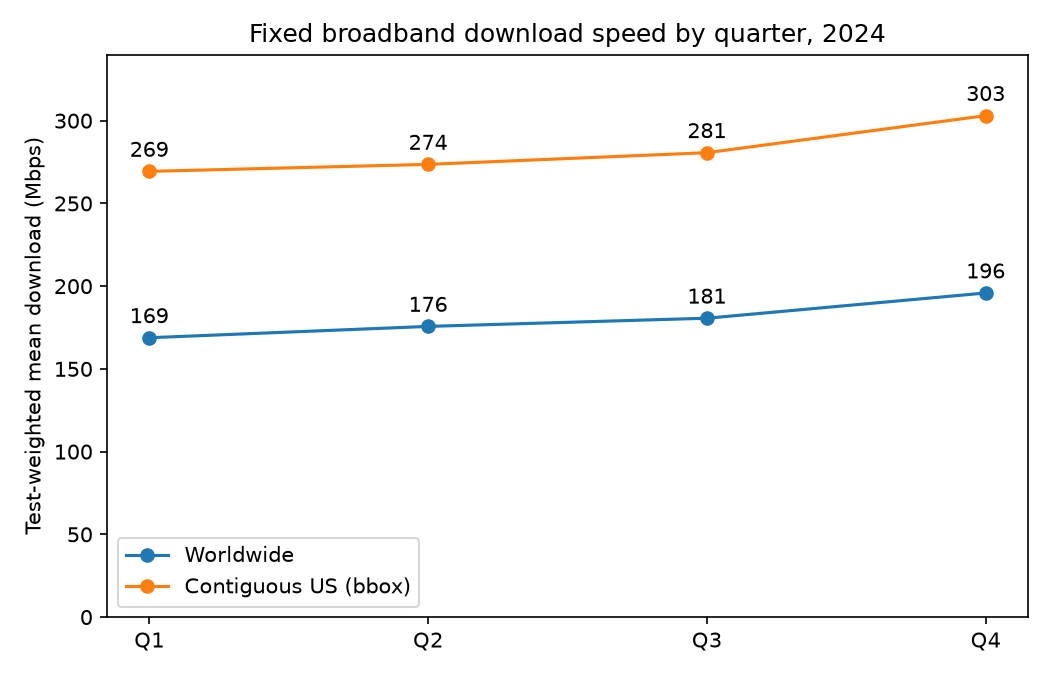
The agent prints each piece of code it runs, followed by the output. Its first call loads the four quarters, about 26 million rows, into `tiles`, and every call after that works on the dataframe already in memory. Output from one run, trimmed:
```text theme={null}
>>> import pandas as pd, pyarrow.parquet as pq, os
... fs=[]
... for q in range(1,5):
... p=f"/data/quarter={q}/2024-{(q-1)*3+1:02d}-01_performance_fixed_tiles.parquet"
... d=pd.read_parquet(p,columns=['tile_x','tile_y','avg_d_kbps','avg_lat_ms','tests']);d['quarter']=q;fs.append(d)
... tiles=pd.concat(fs,ignore_index=True)
... print(tiles.shape);print(tiles.isna().sum().to_dict());print(tiles.describe().T[['min','max','mean']])
(26364521, 6)
(output trimmed)
>>> def wm(g): return (g.avg_d_kbps*g.tests).sum()/g.tests.sum()
... us=tiles[tiles.tile_x.between(-125,-66)&tiles.tile_y.between(24,50)]
(code trimmed)
world_mbps us_mbps world_tests us_tests world_tiles us_tiles
quarter
1 168.8 269.4 118589626 19831638 6655986 1707697
2 175.7 273.6 104427060 18476595 6492072 1726030
3 180.6 280.7 107417601 19345051 6655377 1744184
4 195.9 303.1 104326033 19550227 6561086 1733619
(two more calls trimmed: a sanity check, then the chart and report)
Fixed broadband download speeds rose every quarter of 2024. The test-weighted mean went from 168.8 Mbps in Q1 to 195.9 Mbps in Q4 worldwide (+16%). In the contiguous US it went from 269.4 to 303.1 Mbps (+12.5%), and the biggest jump in both came in Q4.
(answer and report trimmed)
```
The chart, downloaded from the disk to `download-by-quarter.png`:
 ## Continue in a later session
A paused sandbox keeps its memory, so the kernel and everything in it come back on `resume()`. Before handing the agent its next question, the script runs a line of its own in the kernel to show that `tiles` is still loaded. The agent then builds on it without reading the files again.
```typescript session-2.ts theme={null}
import * as archil from "disk";
import { writeFile } from "node:fs/promises";
import { createAnalyst, runPython } from "./agent.ts";
const sandbox = (await archil.listSandboxes()).find((s) => s.name === "code-interpreter")!;
await sandbox.resume();
console.log(await runPython(sandbox, 'print(f"tiles: {len(tiles):,} rows in memory")'));
const agent = createAnalyst(sandbox);
const { text } = await agent.generate({
prompt:
"Using the tiles dataframe that's already loaded, look at latency in Q4: what share of tests had " +
"an average latency under 20 ms, worldwide and in the contiguous US? Save a chart to " +
"/workspace/output/latency-q4.png and append a section to /workspace/output/report.md.",
});
console.log(`\n${text}`);
await sandbox.exec("archil sync /workspace");
const mount = sandbox.mounts.find((m) => m.path === "/workspace")!;
const workspace = await archil.getDisk(mount.diskId);
await writeFile("latency-q4.png", await workspace.getObject("output/latency-q4.png"));
console.log(new TextDecoder().decode(await workspace.getObject("output/report.md")));
await sandbox.pause();
```
```python session-2.py theme={null}
import archil
from agent import run_agent, run_python
sandbox = next(s for s in archil.list_sandboxes() if s.name == "code-interpreter")
sandbox.resume()
print(run_python(sandbox, 'print(f"tiles: {len(tiles):,} rows in memory")'))
text = run_agent(
sandbox,
"Using the tiles dataframe that's already loaded, look at latency in Q4: what share of tests had "
"an average latency under 20 ms, worldwide and in the contiguous US? Save a chart to "
"/workspace/output/latency-q4.png and append a section to /workspace/output/report.md.",
)
print(f"\n{text}")
sandbox.exec("archil sync /workspace")
mount = next(m for m in sandbox.mounts if m.path == "/workspace")
workspace = archil.get_disk(mount.disk_id)
with open("latency-q4.png", "wb") as f:
f.write(workspace.get_object("output/latency-q4.png"))
print(workspace.get_object("output/report.md").decode())
sandbox.pause()
```
The first line comes from the script's own `runPython` call, before the agent does anything. After that, the agent checks what's in the kernel and answers from `tiles` without reading any Parquet files. Output from one run, trimmed:
```text theme={null}
tiles: 26,364,521 rows in memory
>>> try:
... print(tiles.shape); print(tiles.dtypes); print(tiles.head())
(output and two more inspection calls trimmed)
>>> print(us.columns.tolist(), us.quarter.value_counts().sort_index().to_dict(), us.tile_x.agg(['min','max']).tolist(), us.tile_y.agg(['min','max']).tolist())
... q4=tiles[tiles.quarter==4]
... m=(q4.tile_x.between(-125,-66))&(q4.tile_y.between(24,50))
... def share(d):
... return d.tests[d.avg_lat_ms<20].sum()/d.tests.sum(), d.tests.sum(), len(d)
... w=share(q4); u=share(q4[m]); print(w,u)
... print((q4[m].avg_d_kbps*q4[m].tests).sum()/q4[m].tests.sum()/1000)
['tile_x', 'tile_y', 'avg_d_kbps', 'avg_lat_ms', 'tests', 'quarter'] {1: 1707697, 2: 1726030, 3: 1744184, 4: 1733619} [-124.99969999999999, -66.0031] [24.003800000000002, 49.998900000000006]
(np.float64(0.8092839397046756), np.int64(104326033), 6561086) (np.float64(0.7952972106155085), np.int64(19550227), 1733619)
303.06130137808634
(chart and report call trimmed)
In Q4 2024, 80.9% of worldwide tests (104.3M) were in tiles with average latency under 20 ms. In the contiguous US the figure was 79.5% (19.6M tests).
(answer and report trimmed)
```
Pausing is the right default between sessions that are minutes or hours apart. If you `stop()` the sandbox instead, memory is discarded: the `kernel` service starts again on the next boot with an empty kernel, and the agent reloads the data. The Python environment on the root filesystem and everything in `/workspace` are kept either way.
## Clean up
A sandbox must be stopped before it can be deleted, and a paused sandbox can be stopped directly. Stop and delete the sandbox, then delete both disks. Deleting `ookla-speedtests` removes only the Archil disk, not the public bucket behind it.
```typescript cleanup.ts theme={null}
import * as archil from "disk";
const sandbox = (await archil.listSandboxes()).find((s) => s.name === "code-interpreter")!;
await sandbox.stop();
await sandbox.delete();
for (const mount of sandbox.mounts) {
await (await archil.getDisk(mount.diskId)).delete();
}
```
```python cleanup.py theme={null}
import archil
sandbox = next(s for s in archil.list_sandboxes() if s.name == "code-interpreter")
sandbox.stop()
sandbox.delete()
for mount in sandbox.mounts:
archil.get_disk(mount.disk_id).delete()
```
## Next steps
Give an agent a bash tool and a persistent sandbox to build and run a web app.
Lifecycle, services, pausing, and network access in detail.
Mount one disk in several sandboxes at once with read-only and conditional mounts.
Full reference for sandboxes, disks, and `exec` options.
This documentation is built and hosted on [Mintlify](https://mintlify.com), a developer documentation platform.
## Continue in a later session
A paused sandbox keeps its memory, so the kernel and everything in it come back on `resume()`. Before handing the agent its next question, the script runs a line of its own in the kernel to show that `tiles` is still loaded. The agent then builds on it without reading the files again.
```typescript session-2.ts theme={null}
import * as archil from "disk";
import { writeFile } from "node:fs/promises";
import { createAnalyst, runPython } from "./agent.ts";
const sandbox = (await archil.listSandboxes()).find((s) => s.name === "code-interpreter")!;
await sandbox.resume();
console.log(await runPython(sandbox, 'print(f"tiles: {len(tiles):,} rows in memory")'));
const agent = createAnalyst(sandbox);
const { text } = await agent.generate({
prompt:
"Using the tiles dataframe that's already loaded, look at latency in Q4: what share of tests had " +
"an average latency under 20 ms, worldwide and in the contiguous US? Save a chart to " +
"/workspace/output/latency-q4.png and append a section to /workspace/output/report.md.",
});
console.log(`\n${text}`);
await sandbox.exec("archil sync /workspace");
const mount = sandbox.mounts.find((m) => m.path === "/workspace")!;
const workspace = await archil.getDisk(mount.diskId);
await writeFile("latency-q4.png", await workspace.getObject("output/latency-q4.png"));
console.log(new TextDecoder().decode(await workspace.getObject("output/report.md")));
await sandbox.pause();
```
```python session-2.py theme={null}
import archil
from agent import run_agent, run_python
sandbox = next(s for s in archil.list_sandboxes() if s.name == "code-interpreter")
sandbox.resume()
print(run_python(sandbox, 'print(f"tiles: {len(tiles):,} rows in memory")'))
text = run_agent(
sandbox,
"Using the tiles dataframe that's already loaded, look at latency in Q4: what share of tests had "
"an average latency under 20 ms, worldwide and in the contiguous US? Save a chart to "
"/workspace/output/latency-q4.png and append a section to /workspace/output/report.md.",
)
print(f"\n{text}")
sandbox.exec("archil sync /workspace")
mount = next(m for m in sandbox.mounts if m.path == "/workspace")
workspace = archil.get_disk(mount.disk_id)
with open("latency-q4.png", "wb") as f:
f.write(workspace.get_object("output/latency-q4.png"))
print(workspace.get_object("output/report.md").decode())
sandbox.pause()
```
The first line comes from the script's own `runPython` call, before the agent does anything. After that, the agent checks what's in the kernel and answers from `tiles` without reading any Parquet files. Output from one run, trimmed:
```text theme={null}
tiles: 26,364,521 rows in memory
>>> try:
... print(tiles.shape); print(tiles.dtypes); print(tiles.head())
(output and two more inspection calls trimmed)
>>> print(us.columns.tolist(), us.quarter.value_counts().sort_index().to_dict(), us.tile_x.agg(['min','max']).tolist(), us.tile_y.agg(['min','max']).tolist())
... q4=tiles[tiles.quarter==4]
... m=(q4.tile_x.between(-125,-66))&(q4.tile_y.between(24,50))
... def share(d):
... return d.tests[d.avg_lat_ms<20].sum()/d.tests.sum(), d.tests.sum(), len(d)
... w=share(q4); u=share(q4[m]); print(w,u)
... print((q4[m].avg_d_kbps*q4[m].tests).sum()/q4[m].tests.sum()/1000)
['tile_x', 'tile_y', 'avg_d_kbps', 'avg_lat_ms', 'tests', 'quarter'] {1: 1707697, 2: 1726030, 3: 1744184, 4: 1733619} [-124.99969999999999, -66.0031] [24.003800000000002, 49.998900000000006]
(np.float64(0.8092839397046756), np.int64(104326033), 6561086) (np.float64(0.7952972106155085), np.int64(19550227), 1733619)
303.06130137808634
(chart and report call trimmed)
In Q4 2024, 80.9% of worldwide tests (104.3M) were in tiles with average latency under 20 ms. In the contiguous US the figure was 79.5% (19.6M tests).
(answer and report trimmed)
```
Pausing is the right default between sessions that are minutes or hours apart. If you `stop()` the sandbox instead, memory is discarded: the `kernel` service starts again on the next boot with an empty kernel, and the agent reloads the data. The Python environment on the root filesystem and everything in `/workspace` are kept either way.
## Clean up
A sandbox must be stopped before it can be deleted, and a paused sandbox can be stopped directly. Stop and delete the sandbox, then delete both disks. Deleting `ookla-speedtests` removes only the Archil disk, not the public bucket behind it.
```typescript cleanup.ts theme={null}
import * as archil from "disk";
const sandbox = (await archil.listSandboxes()).find((s) => s.name === "code-interpreter")!;
await sandbox.stop();
await sandbox.delete();
for (const mount of sandbox.mounts) {
await (await archil.getDisk(mount.diskId)).delete();
}
```
```python cleanup.py theme={null}
import archil
sandbox = next(s for s in archil.list_sandboxes() if s.name == "code-interpreter")
sandbox.stop()
sandbox.delete()
for mount in sandbox.mounts:
archil.get_disk(mount.disk_id).delete()
```
## Next steps
Give an agent a bash tool and a persistent sandbox to build and run a web app.
Lifecycle, services, pausing, and network access in detail.
Mount one disk in several sandboxes at once with read-only and conditional mounts.
Full reference for sandboxes, disks, and `exec` options.
This documentation is built and hosted on [Mintlify](https://mintlify.com), a developer documentation platform.