

- A triage job that runs every few minutes. Deterministic SQL finds anomalies, a decision model that costs a fraction of a cent per run picks the ones that matter, and a frontier model investigates only those. Quiet runs don’t call a model at all.
- Dashboards on request. Ask a question in plain English and get back a link to a page of charts that answers it, plus a script that rebuilds the page without the model.
This works well on Archil for a few reasons:
- Logs are ordinary files, so the agent uses
grepand SQL, which it already knows well, instead of a vendor query language. - Queries run next to the data. The agent’s commands run in serverless microVMs that mount the disk, so logs are never downloaded to where the agent runs. In our runs, a DuckDB query across every log file returned in 237 ms.
- The agent can’t change the logs. It mounts the log disk read-only and keeps its notes, reports, and dashboards on a second disk.
- Every instance writes to the same disk. In conditional mode, any number of hosts can write to one disk at the same time, and each line is readable by other clients as soon as it’s written.
Prerequisites
Export your Archil API key, a region that offers sandboxes (aws-us-east-1, aws-us-west-2, or aws-eu-west-1), and an
AI Gateway key for the model. Then install the dependencies:
npx tsx <name>.ts.
Write logs to a disk
You’ll run a small demo shop in a persistent sandbox that mounts the log disk and writes to it directly. In production, you mount the disk wherever your services run; see Run it in production.The log handler
archil_logging.py is a standard Python logging handler. It writes each record as one JSON line to
<service>/<YYYY-MM-DD>/<HH>/<host>.ndjson, with hours in UTC:
- One directory per hour, so a query for a time window only reads the hours it needs.
- One file per host. When many hosts write to one disk in conditional mode and two of them write the same part of a
file, the last write wins. Giving every writer its own file avoids that. The host name comes from the
INSTANCEenvironment variable, or the machine’s hostname. - Every line has
ts,level,service,host, andmsg, plus whatever fields you pass, so the agent can rely on them. - Writes happen on a background thread.
archil_loggerputs records on a queue with Python’sQueueHandler, and aQueueListenerthread writes them out. In our runs, an append took microseconds, but closing the previous hour’s file waits for its writes to reach the disk in conditional mode. The queue keeps waits like that off your request path.
archil_logging.py
The demo services
shop.py stands in for three services: api, checkout, and worker. Every api request has a request_id that also
appears in the checkout service’s log line, so the agent can follow a request across services. The worker fails about 8%
of send_receipt jobs with an SMTP error. This is the kind of steady background noise that a useful triage job should not
page you for. Two flag files let you cause trouble when you’re ready: /tmp/break-checkout makes checkout’s payment calls
time out, and /tmp/heic-uploads makes the worker fail on HEIC images, a new error that doesn’t affect anyone’s order.
shop.py
Start everything
The setup script creates two disks:app-logs for the logs and obs-agent for the agent’s tools and output. It then
starts the sandbox and runs the shop as a supervised service.
The sandbox mounts app-logs in conditional mode, the mode you’d use for a fleet of hosts. idleTtlSeconds: 0 keeps it
running when no one is connected.
Finally, the script installs the agent’s tools on obs-agent: the DuckDB command-line binary and Vega. With them, this
small script renders a Vega-Lite chart to SVG:
vl2svg.mjs
setup.ts
query.ts
Give the agent the logs
createDiskTools turns a workspace of Archil disks into AI SDK tools: read_file, write_file,
delete_file, list_files, glob, grep, and run_bash. This workspace mounts app-logs read-only at /logs and
obs-agent at /agent. run_bash runs each command in a fresh serverless microVM with both disks mounted, and grep
searches files in parallel next to the data with disk.grep.
The instructions describe the log layout and how to query it. Both agents in this guide share this module:
agent.ts
Triage errors on a schedule
Most triage runs find nothing, and a frontier model is an expensive way to find nothing. So triage runs in three steps, and each step runs only if the one before it found something:- Detect with deterministic SQL. A DuckDB query compares the last 15 minutes with the hour before. It flags error types that are new or at least twice as common as before, and paths whose p95 latency at least doubled. It runs in one serverless call, next to the data, with no model.
- Classify with a decision model.
experimental_decideasks a small decision model whether each anomaly needs an investigation, and gets back a typed answer with probabilities instead of prose. This guide usestypesafe-ai/jevthrough AI Gateway. Any decision model in the gateway works. - Investigate with a frontier model, only for what the classifier flagged. The agent from the previous section
confirms the problem, measures its impact, traces requests across services, writes a report, and records the issue in
/agent/triage/known-issues.md. The classifier reads those notes on later runs, so an issue that’s already been reported isn’t investigated again unless it gets worse.
smtp 550 and smtp 551 count as one error type:
detect.sql
triage.ts runs the three steps and prints the cost of each model call, which AI Gateway reports with every response.
The investigation returns structured output, validated against a Zod schema, so you can route issues
by severity or open tickets from them without parsing prose. If SLACK_WEBHOOK_URL is set, the script also posts each
issue to that incoming webhook.
triage.ts
break.ts
triage.ts again a couple of minutes later:
request_id. It took 9 steps and $0.47, with most of its input served from the gateway’s cache. The model writes its
own summary, so your wording and numbers will differ.
Run triage again while checkout is still broken. The classifier finds the issue in the notes and stops there:
triage.ts every few minutes with any scheduler, such as cron or a scheduled GitHub
Actions workflow. Quiet runs cost one serverless call:
Build dashboards on request
The dashboard agent explores the logs, and then writesbuild.sh, a script that queries the logs with DuckDB, renders each
chart to SVG, and writes a static index.html. Then it runs the script and checks the page. The script uses time windows
relative to when it runs, so the page can be rebuilt later without the model.
The script shares the page with a share URL. Anyone with the link can open it, with no
Archil account, until it expires (24 hours by default, up to 7 days). The link serves the page with scripts disabled, so
the charts are rendered to SVG ahead of time rather than in the browser.
dashboard.ts
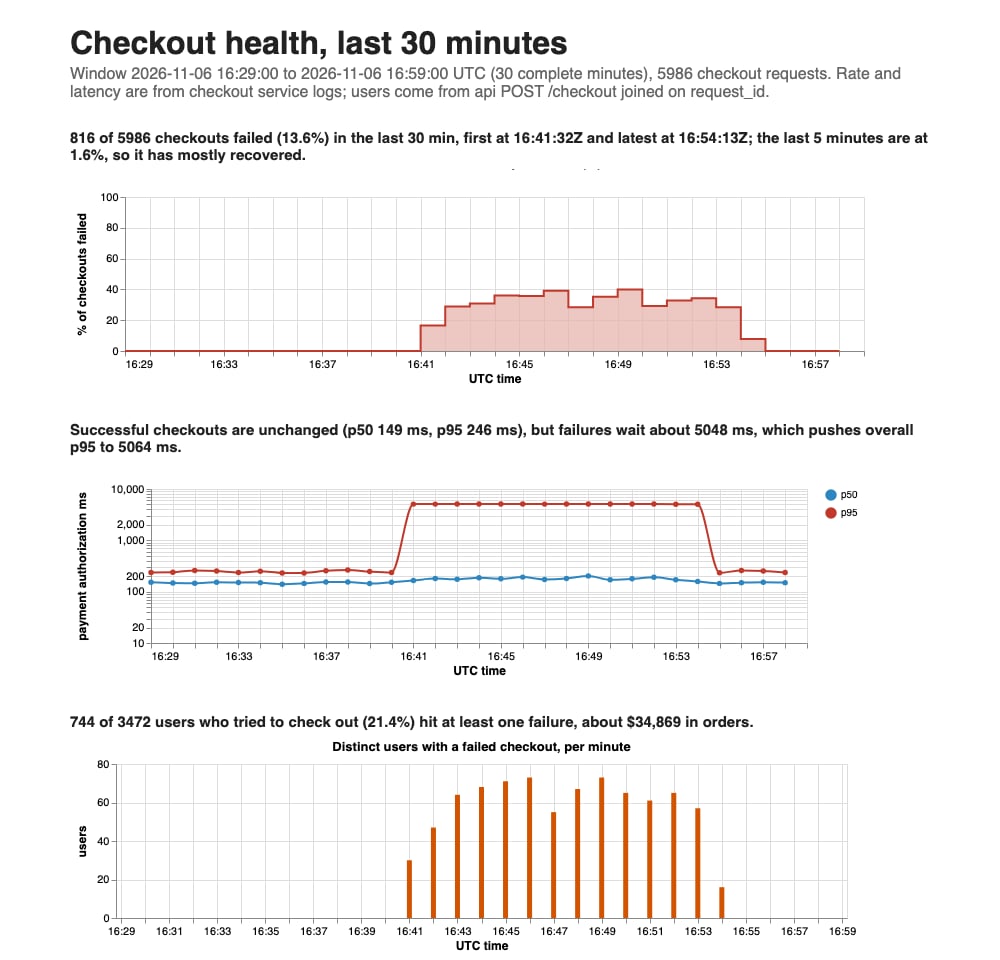
The top of the dashboard the agent built, rebuilt without the model after checkout recovered.
Rebuild a dashboard without the model
build.sh is an ordinary script on the disk, so rebuilding a dashboard is one serverless call, with no model:
refresh.ts
Run it in production
Mount theapp-logs disk in conditional mode wherever your services run, and log through archil_logger. The agent
scripts stay the same.
- Kubernetes
- VMs
Mount the disk with the CSI driver as a A pod’s hostname is its name, so each replica writes its own files without setting
ReadWriteMany volume, which mounts it in
conditional mode. Create the PersistentVolume and a PersistentVolumeClaim named app-logs as shown in
Static provisioning, then mount the claim into each service’s pods:INSTANCE.-
Several processes per host. If a host runs several processes that log, such as Gunicorn workers, give each one its
own file: pass
host=f"{socket.gethostname()}-{os.getpid()}"toarchil_logger. -
Other languages. Any logger can write the same layout: one JSON object per line with
ts,level,service,host, andmsg, appended to<service>/<YYYY-MM-DD>/<HH>/<host>.ndjson, one file per process, written off the request path. -
Retention. Each day is its own directory, so retention is a daily delete. This serverless command removes the
logs from 30 days ago. It mounts the disk in conditional mode, so it can delete while your services keep writing:
-
Big log volumes. Tell the agent to glob only the hours it needs (the instructions in
agent.tsalready do) so its queries read only those files. For long-range questions, have a scheduled job compact older hours into Parquet with DuckDB’sCOPY ... TO. - Sensitive data. The agent and anyone with a share link can see what’s in the logs. Remove secrets and personal data before you log them.
Clean up
Delete the sandbox and both disks:cleanup.ts
Next steps
- AI SDK integration: mount several disks as one workspace and choose what the agent can reach
- Search files: limits and concurrency for the parallel search behind the
greptool - Search logs across sandboxes: search the same kind of logs with
disk.grepandjq, without an agent - Analytics with DuckDB: query Parquet in an S3 bucket and serve results over HTTPS
- Sharing disks: how exclusive, shared, and conditional mounts behave